AllMyBatteries App Icon
Available on iOS, macOS & watchOS

All Your Batteries
One App

Stop hunting across devices to check battery levels. AllMyBatteries tracks every device you own — all in one beautiful dashboard, synced via iCloud.

Download Free on the App Store See Features
Compatibility

Tracks Every Device You Own

From your daily iPhone to Bluetooth controllers and HomeKit sensors — if it has a battery, AllMyBatteries can track it.
📱
iPhone
All models
iPad
All models
💻
MacBook
Via Mac app
Apple Watch
All Series
🎧
AirPods
All & Beats
✏️
Apple Pencil
All generations
⌨️
Magic Keyboard
Trackpad & Mouse
🔋
MagSafe
Battery pack
🎮
Bluetooth Devices
Controllers & more
🏠
HomeKit
Smart accessories
🤖
Android
Via helper app
🔧
Custom Devices
Manual & Shortcuts
Widgets

Your Batteries, Always in View

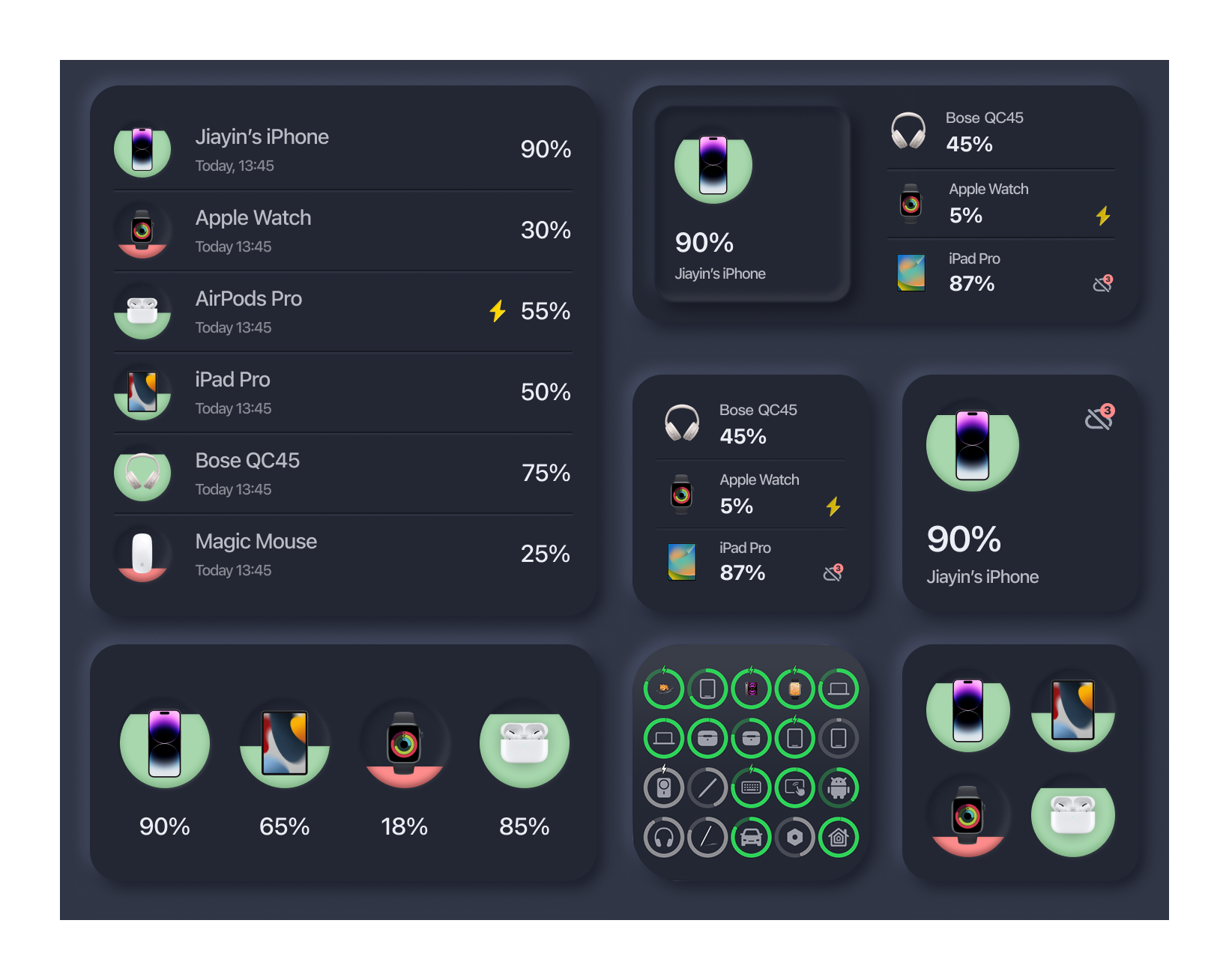
AllMyBatteries widget examples showing battery levels for multiple devices

Glanceable Battery Dashboard

Place widgets on your iPhone home screen, lock screen, iPad, or even your Apple Watch face. Choose which devices to feature, and pick the layout that fits your style.

AllMyBatteries updates widgets in the background so your battery levels stay current even when you don't open the app.

📱 Small 📱 Medium 📱 Large ⌚ Watch 🔒 Lock Screen
Features

Everything You Need to Stay Charged

Smart alerts, beautiful widgets, and deep Apple ecosystem integration — AllMyBatteries has every detail covered.

🔔

Smart Battery Alerts

Get notified the moment any device drops below your custom low battery threshold — or when it finishes charging. Never get caught off-guard again.

📊

Widgets on Every Screen

Add home screen and lock screen widgets in small, medium, and large sizes. Watch widgets too. Keep battery levels a glance away — always.

🖥️

Mac Menu Bar App

A dedicated Mac companion lives in your menu bar, showing all your device batteries without opening the app. Perfect for power users on macOS.

🎙️

Siri & Shortcuts

Ask Siri "What's my AirPods battery?" or build powerful automations with Shortcuts. Force-sync on Bluetooth connection, trigger updates on schedule.

📈

Battery History

View each device's battery level over time to spot patterns and understand drain rates. Know which device needs attention before it dies.

🎨

Fully Customizable

Set custom icons for every device, personalize battery ring colors, choose list or grid layout, and pick light or dark mode — make it yours.

iCloud Sync

See Everything, Everywhere

Battery data flows through iCloud so your dashboard is always in sync — whether you check from your iPhone, iPad, Mac, or Apple Watch.

📱
iPhone
📲
iPad
☁️
iCloud
💻
Mac
Apple Watch
How It Works

Simple Setup, Smart Updates

Install AllMyBatteries on each of your Apple devices. They sync automatically through iCloud — no accounts, no servers, just your data.

Install AllMyBatteries on each device and open it once. It automatically uploads that device's battery to iCloud and appears in your list on all your other devices. No manual pairing needed.
AirPods battery is read from the device they're paired with. When your AirPods are connected to your iPhone and AllMyBatteries refreshes, it captures both earbud and case levels and syncs them to all your devices via iCloud. On Mac, install the Bluetooth Helper for even faster updates.
AllMyBatteries is designed to be extremely lightweight. It uses iOS Background App Refresh (which the system controls and throttles) and iCloud's efficient push sync. The impact on your own battery is negligible.
Yes! Install the AllMyBatteries helper app on your Android device and make sure both are on the same Wi-Fi network. The Android device's battery will then appear in your AllMyBatteries dashboard alongside your Apple devices.
While the app is in the foreground, the current device updates about every minute, and Bluetooth devices every 10 minutes. In the background, iOS allows refresh every 15–60 minutes depending on system conditions. Widgets follow the same background refresh schedule.
Absolutely. AllMyBatteries syncs exclusively through your personal iCloud account using CloudKit. Your battery data never touches any third-party servers — it stays between your devices and Apple's iCloud infrastructure.
Get Started

Never Wonder About a Battery Again

Free to download. Works with your entire Apple ecosystem out of the box.

📱 iPhone 📲 iPad 💻 Mac ⌚ Apple Watch 🆓 Free